


New (2024) Microsoft PL-200 Exam Dumps
Best Way To Study For Microsoft PL-200 Exam Brilliant PL-200 Exam Questions PDF
Microsoft PL-200 exam is a multiple-choice exam that consists of 40-60 questions. PL-200 exam duration is 150 minutes. The passing score for the exam is 700 out of 1000. PL-200 exam can be taken online or at a testing center. It is recommended that candidates take the exam after completing the Microsoft Power Platform Functional Consultant course.
Microsoft PL-200 certification exam is intended for candidates who have experience with functional consultant roles, including creating and managing solutions that use Power Apps, Power Automate, Power BI, and Power Virtual Agents. PL-200 exam is structured to cover various topics such as configuring security and compliance, implementing Common Data Service, designing and developing Power Apps, integrating Power Virtual Agents, and creating and sharing reports using Power BI. PL-200 exam is designed to test the candidate's knowledge and skills in these areas through a series of multiple-choice questions.
Microsoft PL-200 exam is an excellent opportunity for individuals who want to demonstrate their expertise in Power Platform. It is a challenging exam that covers a wide range of topics, but passing it can open up new career opportunities and help individuals stand out in the job market. By preparing for the exam and gaining a deep understanding of the Power Platform, individuals can become valuable assets for organizations looking to leverage these powerful tools to drive growth and improve their business processes.
NEW QUESTION # 40
You create a parent entity and a child entity. The parent entity has a 1:N relationship with the child entity.
You need to ensure that when the owner changes on the parent record that all child records are assigned to the new owner.
You need to configure the relationship behavior type.
What should you use?
- A. Restrict
- B. Referential
- C. Parental
- D. Referential, Restrict Delete
Answer: C
Explanation:
https://docs.microsoft.com/en-us/dynamics365/customer-engagement/customize/create-and-edit-1n-relationships#relationship-behavior A parental table relationship is any 1:N table relationship where one of the cascading options in the Parental column of the following table is true.
Reference:
https://docs.microsoft.com/en-us/powerapps/maker/data-platform/create-edit-entity-relationships
NEW QUESTION # 41
A company's sales staff wants a simplified way to manage their opportunities in Dynamics 365 Sales without adding custom code.
You need to provide a solution for each requirement.
Which solutions should you provide? To answer, select the appropriate options in the answer area.
NOTE: Each correct selection is worth one point.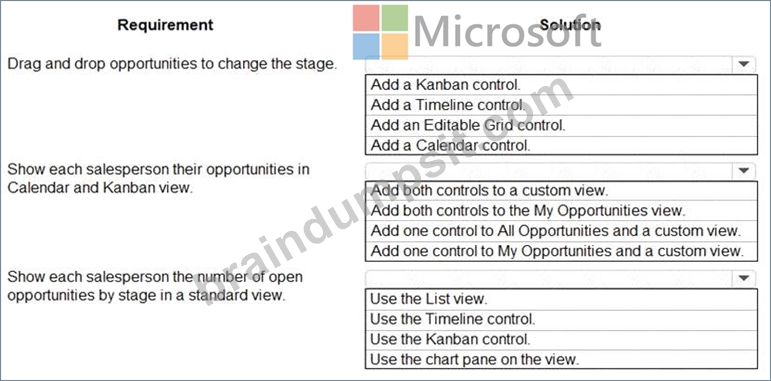
Answer:
Explanation:
Explanation
Graphical user interface, text, application, email Description automatically generated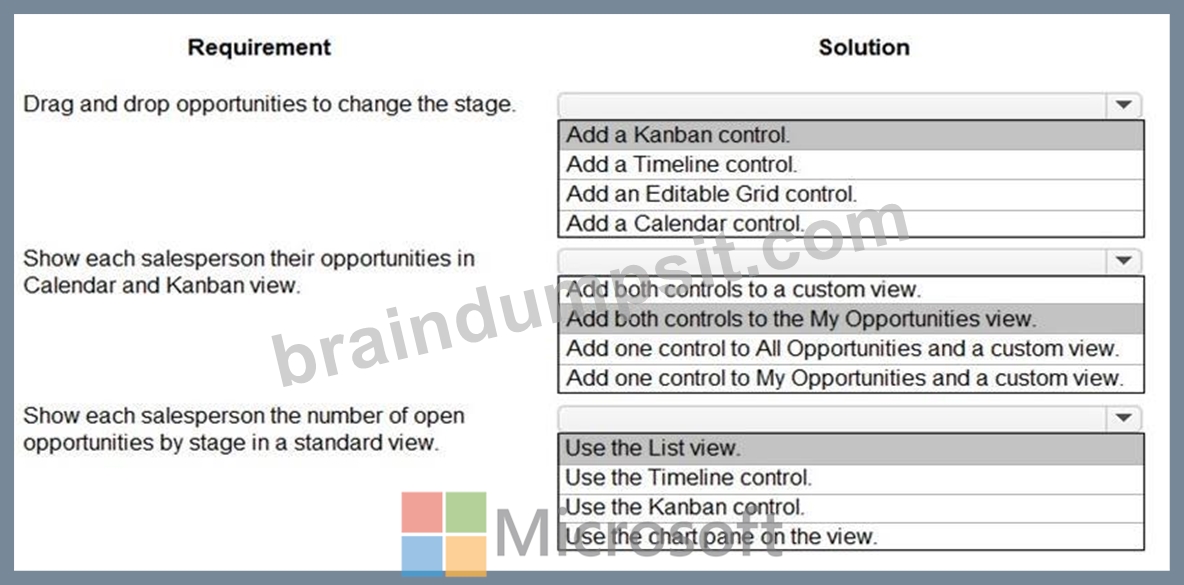
Box 1: Add a Kanban control.
The Kanban view allows your sales team to move opportunities from one stage to another by simply dragging them.
Box 2: Add both controls to the My Opportunities view.
* Kanban views help salespeople to manage their opportunities and activities effectively. Add the Kanban control to the Opportunity and Activity entity so salespeople can use the Kanban views.The Kanban control works only on the Opportunity and Activity entities.
* If you use unified interface, you can display any record in a calendar view via the calendar control.
- Go to Settings->Customization->Customize the System
- Open the configuration for the entity that you want to use the calendar control (Opportunities in our example)
- Click the View tab
- Click "Add Control" and select the calendar control.
- Click the dot for every interface from which you want the calendar control to be available.
Box 3: Use a List view
opportunities in Dynamics 365 Sales
Reference:
https://docs.microsoft.com/en-us/dynamics365-release-plan/2020wave1/dynamics365-sales/work-opportunities-k
https://crmtipoftheday.com/1206/view-any-dynamics-365-record-on-a-calendar/
https://fivep.com.au/how-to-get-visibility-and-report-on-an-opportunities-active-current-sales-stage-without-code
NEW QUESTION # 42
A customer uses Power Apps to view and maintain their contacts that are stored in Microsoft Dataverse.
Several columns must be configured to ensure the security settings for sales associates are view only.
You need to configure the access restrictions.
Which component for field-level security should you use? TO answer, select the appropriate options in the answer area.
NOTE: Each correct selection is worth one point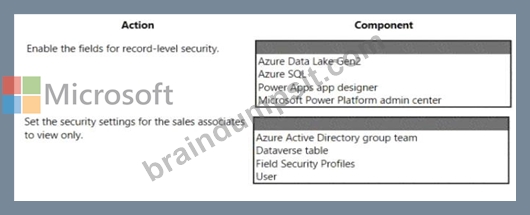
Answer:
Explanation:
Explanation
Graphical user interface, text, application Description automatically generated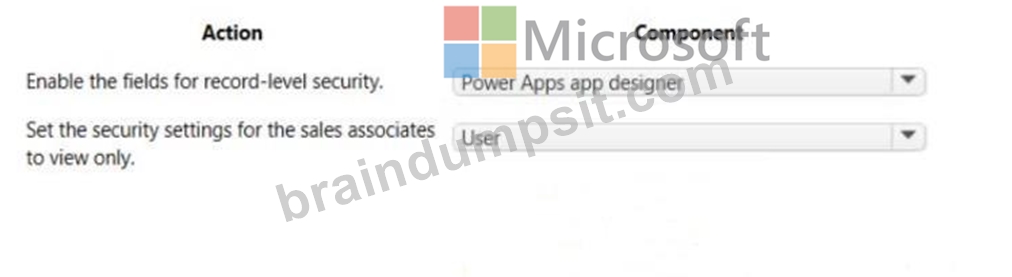
NEW QUESTION # 43
You are a Dynamics 365 for Customer Service developer.
You must trigger a mobile notification whenever a specific hashtag is posted from Twitter. The notification will send email to the company's social media teams distribution list.
You need to create a connection to the Twitter service and build a solution.
Which four actions should you perform in sequence? To answer, move the appropriate actions from the list of actions to the answer area and arrange them in the correct order.
Answer:
Explanation:
NEW QUESTION # 44
A company uses Power Apps with Microsoft Dataverse.
The company enables auditing on the Dataverse database. The company tenant reaches the maximum storage capacity.
You need to delete some auditing data.
Which three deletion options should you use? Each correct answer presents a complete solution.
NOTE: Each correct selection is worth one point.
- A. by table
- B. older than a specified date
- C. by record
- D. by column
- E. between two specified dates
Answer: A,B,E
Explanation:
Explanation
A: Deleting by table allows you to select specific tables in the Dataverse database for which you want to delete the auditing data. This can be done by going to the Power Apps portal, navigating to the Data tab, and selecting the table for which you want to delete the auditing data. You can then select the specific auditing data you want to delete and click the "Delete" button. This is useful if you want to only delete auditing data for specific tables and not for the entire database. Reference:
https://docs.microsoft.com/en-us/power-platform/admin/data/data-management-auditing#delete-audit-logs
C: Deleting between two specified dates allows you to select a range of dates within which the auditing data will be deleted. This can be done by going to the Power Apps portal, navigating to the Data tab, and selecting the "Audit" option. From there, you can select the "Delete" button, and select the "Between two dates" option.
Then you can specify the start and end date for which you want to delete the auditing data. This is useful if you want to delete auditing data for a specific time period and not for the entire database. Reference:
https://docs.microsoft.com/en-us/power-platform/admin/data/data-management-auditing#delete-audit-logs
E: Deleting older than a specified date allows you to select a specific date, and any data older than that date will be deleted. This can be done by going to the Power Apps portal, navigating to the Data tab, and selecting the "Audit" option. From there, you can select the "Delete" button, and select the "Older than a specified date" option. Then you can specify the date for which you want to delete the auditing data. This is useful if you want to delete auditing data that is older than a certain date and not for the entire database. Reference:
https://docs.microsoft.com/en-us/power-platform/admin/data/data-management-auditing#delete-audit-logs It's always good to have a backup of Data before deletion and also check the retention period of the data you want to delete.
NEW QUESTION # 45
You are a Dynamics 365 for Customer Service developer.
You must trigger a mobile notification whenever a specific hashtag is posted from Twitter. The notification will send email to the company's social media teams distribution list.
You need to create a connection to the Twitter service and build a solution.
Which four actions should you perform in sequence? To answer, move the appropriate actions from the list of actions to the answer area and arrange them in the correct order.
Answer:
Explanation:
1 - Sign in to Power Automate and Create an New blank flow.
2 - Select the social media connector and enter the user credentials for the connection.
3 - Create an action to search for the new posts with the hashtag.
4 - Create a trigger to send a mobile notification.
NEW QUESTION # 46
You create a JavaScript web resource named MyBusinessLogic. The code it contains uses functionality from a third-party JavaScript library.
You notice that an independent software vendor (ISV) solution uses the same third-party library in their managed solution.
You plan to deploy your solution to other environments by using a managed solution. The ISV solution might not be installed in the other environments.
You need to package the solution for deployment
What are two ways to achieve this goal? Each correct answer presents a complete solution.
NOTE: Each correct selection is worth one point.
- A. Create a new JavaScript web resource by using the code from the third-party library. Add the new JavaScript web resource along with MyBusinessLogic to the solution.
- B. Add a copy of the JavaScript library from the ISV to the solution along with MyBusinessLogic.
- C. Add the code from the third-party JavaScript library to MyBusinessLogic. Add MyBusinessLogic to the solution.
- D. Add only the third-party JavaScript web resource to the solution.
Answer: A,C
Explanation:
Explanation
Web resources in model-driven apps.
Web resources are virtual files that are stored in the Microsoft Dataverse database and that you can retrieve by using a unique URL address.
Capabilities of web resources.
Web resources represent files that can be used to extend the Dataverse web application such as html files, JavaScript, and CSS, and several image formats.
Reference: https://docs.microsoft.com/en-us/power-apps/developer/model-driven-apps/web-resources
NEW QUESTION # 47
You configure an alert in Power Bl.
You need to alert users when the value of a tile exceeds a threshold. To answer, select the appropriate options in the answer area.
NOTE: Each correct selection is worth one point.
Answer:
Explanation:
Explanation
Reference:
https://docs.microsoft.com/en-us/power-bi/create-reports/service-set-data-alerts
NEW QUESTION # 48
You create a new Power Virtual Agents chatbot for an organization.
Testing and production deployment of the chatbot are not complete.
You need to ensure that appropriate users can access the chatbot.
Which methods should you use? To answer, select the appropriate options in the answer area.
NOTE:Each correct selection is worth one point.
Answer:
Explanation:
Explanation:
Graphical user interface, application Description automatically generated
Box 1: Use the demo website
When publishing the bot to the web, you can publish to a prebuilt demo website (which you can use to share the bot with your teammates and stakeholders) and to your own live website.
Box 2: Share the chatbot to a security group containing all users.
A license for each user, also known as a "per user license" (or "Power Virtual Agent User License" as referred to on the Microsoft 365 admin center), should be assigned to individual users who need access to create and manage chatbots.
To simplify user license management, you can assign licenses to an Azure Active Directory (Azure AD) security group.
Box 3: Embed the chatbot code in an IFRame on your copany's public website You can add your bot to a live website as an IFrame. Your live website can be a customer-facing external website or an internal site, like a SharePoint or Yammer site.
Reference:
https://docs.microsoft.com/en-us/power-virtual-agents/publication-connect-bot-to-web-channels
https://docs.microsoft.com/en-us/power-virtual-agents/requirements-licensing
NEW QUESTION # 49
A Company plans to send escalation emails to all customers with overdue invoices. You are creating a Microsoft Power Automate flow to determine whether to send an escalation email.
The system must send an alert for all invoices that are seven days or more overdue.
You need to configure the flow.
Which expression should you use?
- A. Option A
- B. Option B
- C. Option C
Answer: C
Explanation:
Explanation
Example: equals(triggerOutputs()?['body/PDFStatus/Value'],'Ready to Generate') Reference:
https://evolvous.com/microsoft-power-automate-trigger-condition/
NEW QUESTION # 50
You plan to automate several different processes by using Power Automate.
Each process has unique characteristics.
You need to recommend components for each process.
Which components should you recommend? To answer, drag the appropriate components to the correct processes. Each component may be used once, more than once, or not at all. You may need to drag the split bar between panes or scroll to view content.
NOTE: Each correct selection is worth one point.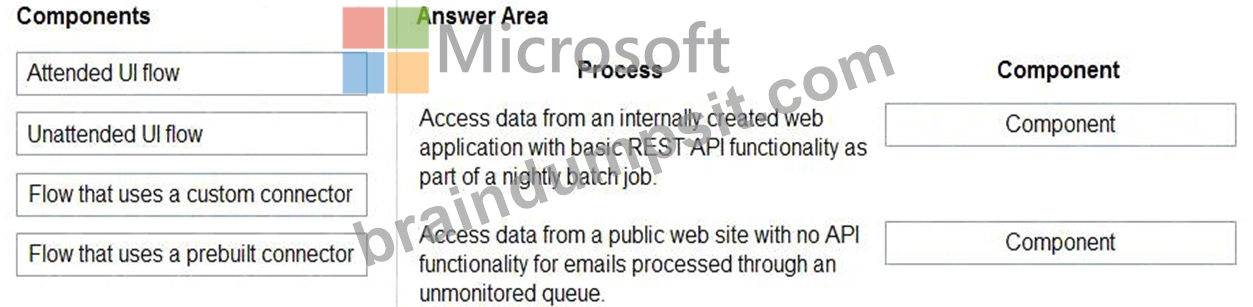
Answer:
Explanation:
Explanation:
1: Custom connector (REST API access)
2: Unatteded UI flow
NEW QUESTION # 51
You are a Dynamics 365 administrator.
You create a new app.
You need to create the site map for the app.
Which three actions should you perform in sequence? To answer, move the appropriate actions from the list of actions to the answer area and arrange them in the correct order.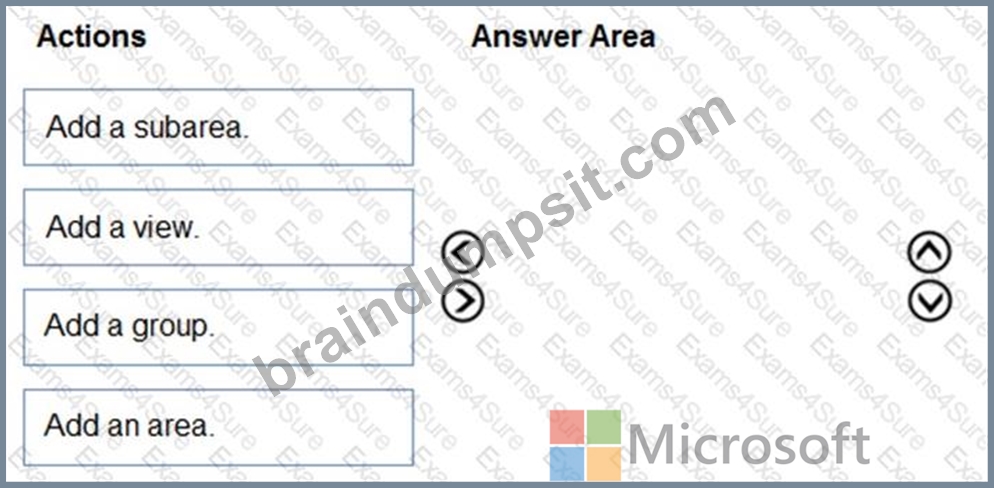
Answer:
Explanation:
Explanation
NEW QUESTION # 52
You are a Dynamics 365 Customer Service developer.
A salesperson creates a chart.
You need to ensure that the chart is available to all users on the team.
Which actions should the salesperson perform? To answer, drag the appropriate actions to the correct users.
Each action may be used once, more than once, or not at all. You may need to drag the split bar between panes or scroll to view content.
NOTE: Each correct selection is worth one point.
Answer:
Explanation:
Explanation
NEW QUESTION # 53
You are designing a canvas app that connects to Common Data Service.
You need to configure the app to meet the requirements and ensure that the canvas app is available offline.
What should you implement? To answer, select the appropriate options in the answer area.
NOTE: Each correct selection is worth one point.
Answer:
Explanation:
Explanation
Reference:
https://docs.microsoft.com/en-us/powerapps/maker/canvas-apps/offline-apps
NEW QUESTION # 54
A company plans to create a Power Virtual Agents chatbot.
The bot has the following requirements:
* Prompt for a location of the customer and the call must be routed to a support agent for the location.
* Transfer support calls at each location to a support bot that uses the Bot Framework.
You need to configure the bot.
Which components should you use? To answer, drag the appropriate components to the correct requirements.
Each component may be used once, more than once, or not at all. You may need to drag the split bar between panes or scroll to view content.
NOTE: Each correct select is worth one point.
Answer:
Explanation:
Explanation
NEW QUESTION # 55
You are creating a Power Virtual Agents chatbot that uses multiple topics.
Each user interaction can reference more than one topic.
You need to be able to capture a value in an initial topic and use it in subsequent topics.
Which type of variable should you create?
- A. Topic
- B. Bot
- C. Context
Answer: B
Explanation:
Reference:
https://docs.microsoft.com/en-us/power-virtual-agents/authoring-variables-bot
NEW QUESTION # 56
A company's sales staff wants a simplified way to manage their opportunities in Dynamics 365 Sales without adding custom code.
You need to provide a solution for each requirement.
Which solutions should you provide? To answer, select the appropriate options in the answer area.
NOTE: Each correct selection is worth one point.
Answer:
Explanation: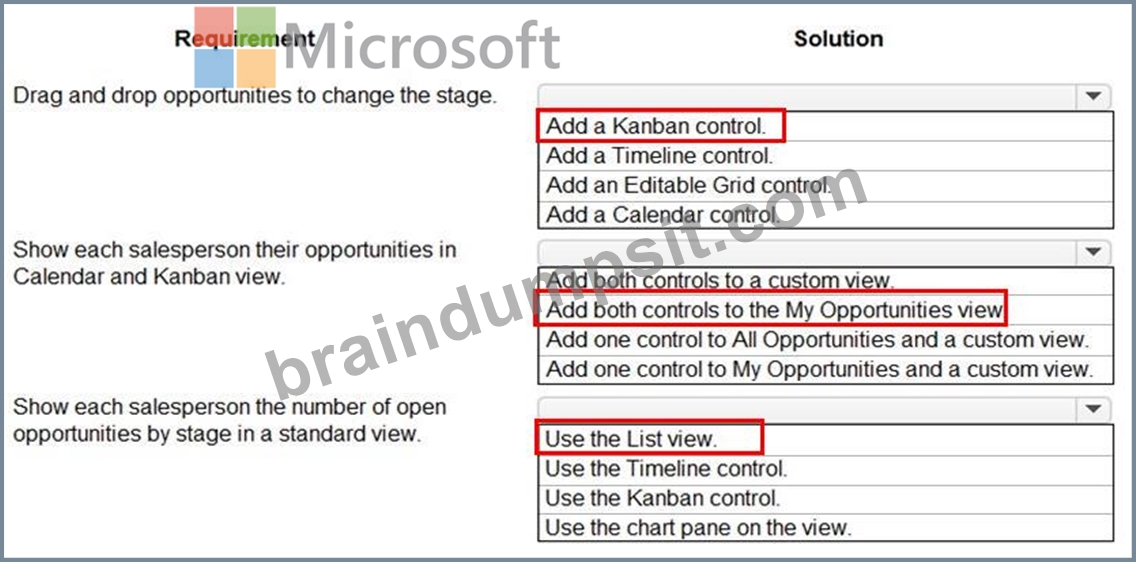
Reference:
https://docs.microsoft.com/en-us/dynamics365-release-plan/2020wave1/dynamics365-sales/work-opportunities-kanban-view
https://crmtipoftheday.com/1206/view-any-dynamics-365-record-on-a-calendar/
https://fivep.com.au/how-to-get-visibility-and-report-on-an-opportunities-active-current-sales-stage-without-code-microsoft-dynamics-365/
NEW QUESTION # 57
You plan to automate several different processes by using Power Automate.
Each process has unique characteristics.
You need to recommend components for each process.
Which components should you recommend? To answer, drag the appropriate components to the correct processes. Each component may be used once, more than once, or not at all. You may need to drag the split bar between panes or scroll to view content.
NOTE: Each correct selection is worth one point.
Answer:
Explanation:
NEW QUESTION # 58
A company has a model-driven app that uses Microsoft Dataverse.
Users need to add an alternate phone number when entering their account information. The users also require a list that displays the customers that do not have an alternate phone number.
You need to enable the required features.
Which features should you use? To answer, drag the appropriate features to the correct requirements. Each feature may be used once, more than once, or not at all. You may need to drag the split bar between panes or scroll to view content.
Answer:
Explanation:
Explanation:
NEW QUESTION # 59
A car dealership has a Dynamics 365 Sales environment for its sales company and another environment for its leasing company.
Users in one environment must not be able to see the other environment.
You need to grant salespeople access to the sales company environment.
What should you do?
- A. Add salespeople to a security role.
- B. Set app security.
- C. Add salespeople to an Office 365 security group.
- D. Set privileges.
Answer: C
Explanation:
Explanation
Explanation/Reference:
https://docs.microsoft.com/en-us/power-platform/admin/control-user-access
NEW QUESTION # 60
A company uses Power Apps and Power Automate.
There is an issue with the existing flow in the test environment. Development changes are allowed in the test environment.
You need to troubleshoot the issue with the flow.
Which command should you use? To answer, select the appropriate options in the answer area.
NOTE: Each correct selection is worth one point.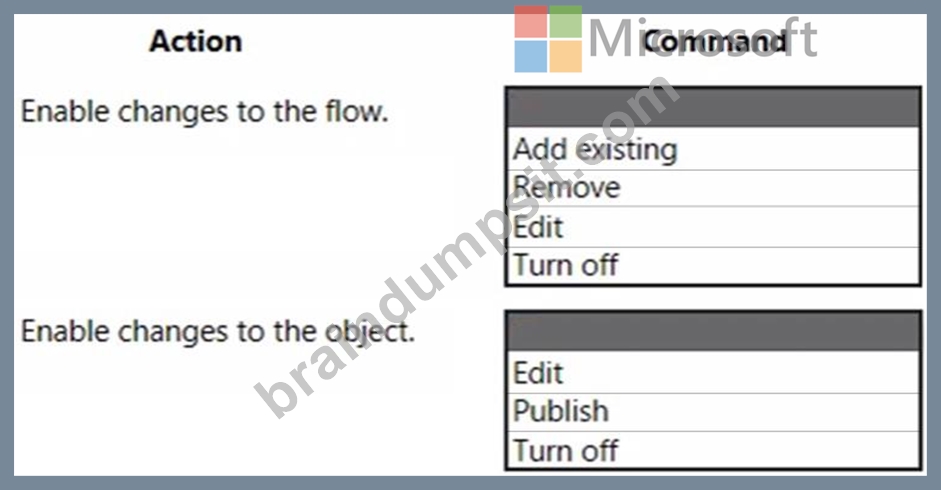
Answer:
Explanation:
NEW QUESTION # 61
You are using Power BI to build a dashboard for a company.
You must make the dashboard available to a specific set of users, including employees and five external users. The number of employees that require access to the dashboard varies, but usually less than 100.
Employees and external users must not be permitted to share the dashboard with other users.
You need to share the dashboard with the employees and external users.
Which three actions should you perform? Each correct answer presents part of the solution.
NOTE: Each correct selection is worth one point.
- A. Create a dynamic distribution list. Add all users to the distribution group and use the list to share the dashboard.
- B. Sign into Power BI Desktop. Open the dashboard and select
- C. Clear the Allow recipients to share your dashboard (or report)
- D. Sign into the Power BI service. Open the dashboard and select
- E. Enter the individual email address of internal and external users.
- F. Create a distribution group. Add all users to the distribution group and use the list to share the dashboard.
Answer: C,D,F
Explanation:
Reference:
https://docs.microsoft.com/en-us/power-bi/collaborate-share/service-share-dashboards
NEW QUESTION # 62
A company has a model-driven app.
The app must meet the following requirements:
* Prevent users from saving a record if validation from a custom action fails.
* Query and update a list of records.
You need to configure processes for the app without using code.
Which processes should you use? To answer, drag the appropriate processes to the correct requirements. Each process may be used once, more than once, or not at all. You may need to drag the split bar between panes or scroll to view content.
NOTE: Each correct selection is worth one point.
Answer:
Explanation:
NEW QUESTION # 63
You are creating a canvas app.
A user will click a button on each screen of a Power Apps app to proceed to the next screen.
You need to implement an action that selects the next screen that the user sees.
Which event should you handle?
- A. OnCheck
- B. OnLoad
- C. ScreenTransition
- D. OnSelect
Answer: D
Explanation:
Add navigation
1. With the Source screen selected, open the Insert tab, select Icons, and then select Next arrow.
2. With the arrow still selected, select the Action tab, and then select Navigate.
3. The OnSelect property for the arrow is automatically set to a Navigate function.
4. When a user selects the arrow, the Target screen fades in.
5. On the Target screen, add a Back arrow, and set its OnSelect property to this formula:
6. Navigate(Source, ScreenTransition.Fade)
7. While holding down the Alt key, toggle between screens by selecting the arrow on each screen.
Reference:
https://docs.microsoft.com/en-us/powerapps/maker/canvas-apps/add-screen-context-variables
NEW QUESTION # 64
A company has a model-driven app that uses Microsoft Dataverse.
Users need to add an alternate phone number when entering their account information. The users also require a list that displays the customers that do not have an alternate phone number.
You need to enable the required features.
Which features should you use? To answer, drag the appropriate features to the correct requirements. Each feature may be used once, more than once, or not at all. You may need to drag the split bar between panes or scroll to view content.
Answer:
Explanation:
Explanation
NEW QUESTION # 65
......
Updated Verified Pass PL-200 Exam - Real Questions and Answers: https://testking.braindumpsit.com/PL-200-latest-dumps.html